Preventing Concurrency Conflicts in EF Core
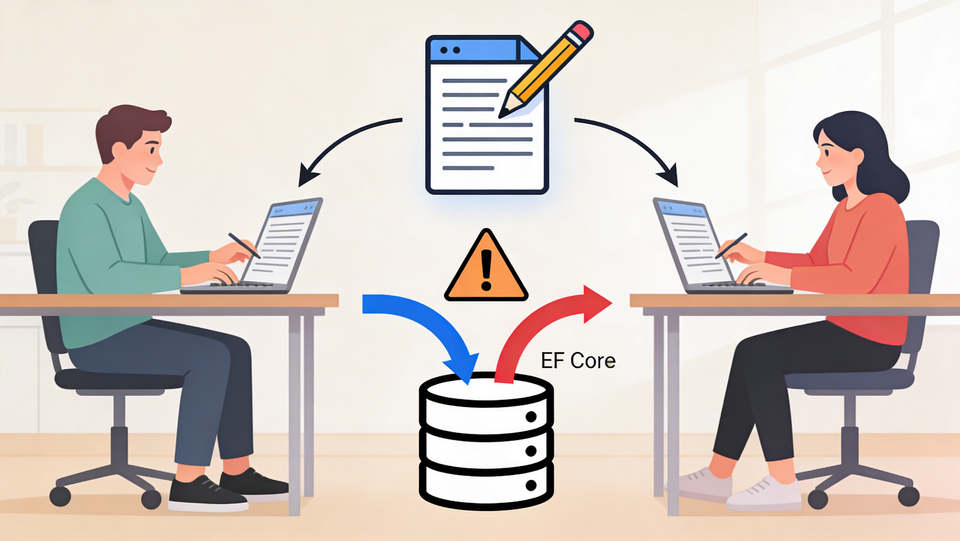
Applications are expected to run multiple instances simultaneously, while supporting many user sessions. This concurrent access, while essential for scalability and responsiveness, can also lead to a common challenge called a race condition, or a concurrency conflict. In keeping with the nomenclature, we will use the term "concurrency conflict" going forward.
Let us explore this type of conflict, how Entity Framework Core (EF Core) addresses them using optimistic concurrency, and how you can effectively implement and manage these mechanisms in your own projects.
What Exactly Are Concurrency Conflicts?
Imagine a web application where multiple users interact with the same data simultaneously. Each request typically establishes its own database connection, and EF Core tracks data in memory for each request. When two different instances try to modify the exact same record simultaneously, it can introduce corruption and inconsistencies into your data. This is the essence of a concurrency conflict.
EF Core assumes that these conflicts are relatively rare. To manage this, it employs a strategy known as optimistic concurrency.
Optimistic Concurrency: The EF Core Approach
Optimistic concurrency is implemented by introducing a concurrency token to each database record. This token is loaded and tracked whenever a query is performed. Think of it like a version control identifier. If you load a record with a specific version identifier (such as a GUID) and another process later modifies that record, the version identifier will change. When you later attempt to save your changes, EF Core compares the version you loaded with the current database version. If they don't match, it signals a concurrency conflict.
How the Concurrency Token Works
The concurrency token acts as a safeguard. When a record is updated, its token should be updated as well. If two users try to update the same record, and one user's changes are saved first, the token is updated. When the second user attempts to save their changes, EF Core will detect that the token in their loaded record no longer matches the current token in the database. This mismatch prevents the second user's potentially outdated changes from overwriting the first user's modifications.
SQL Server, for instance, has a built-in feature called row versioning that can automatically manage these version checks. A TIMESTAMP data type in your model maps directly to SQL Server's row version column, which is managed automatically. This makes implementing optimistic concurrency with SQL Server incredibly straightforward.
When Row Versioning Isn't Native
Not all database engines support built-in row versioning like SQL Server does. For databases like SQLite, you'd need to implement this version tracking manually within your application code. This typically involves adding a version column to your tables and updating it with a new value (such as a GUID) whenever you modify a record. EF Core can then use this manually managed version to perform its concurrency checks.
Pessimistic Concurrency: An Alternative (Briefly)
While this post focuses on optimistic concurrency, it's worth mentioning its counterpart: pessimistic concurrency. This approach involves locking a record while an operation is being performed, ensuring that only one user can access and modify it at a time. This is often achieved using lock objects or semaphores. However, pessimistic concurrency can sometimes lead to performance bottlenecks and deadlocks, which is why optimistic concurrency is generally preferred for many web application scenarios.
Implementing Optimistic Concurrency in EF Core
Let's get hands-on and see how to configure and use optimistic concurrency in your EF Core projects.
1. Defining the Concurrency Token in Your Model
The first step is to designate a property in your entity model as the concurrency token.
Using TIMESTAMP for SQL Server
If you're using SQL Server, the simplest approach is to add a byte[] property to your entity and decorate it with the [Timestamp] attribute. EF Core will automatically map this to the database's row version column.
public class Team
{
    public int Id { get; set; }
    public string Name { get; set; }

    [Timestamp] // This maps to SQL Server's row version
    public byte[] Version { get; set; }
}
Alternatively, you can configure this using the Fluent API in your DbContext:
protected override void OnModelCreating(ModelBuilder modelBuilder)
{
    modelBuilder.Entity<Team>()
        .Property(t => t.Version)
        .IsRowVersion(); // Configures as a row version
}
After making these changes, you'll need to run a migration to update your database schema in SQL Server.
Using [ConcurrencyCheck] and GUID for Other Databases
If you're using a database that doesn't natively support row versioning, or if you prefer a different approach, you can use a GUID as your concurrency token. You'll mark the property with the [ConcurrencyCheck] attribute.
public class Team
{
    public int Id { get; set; }
    public string Name { get; set; }

    [ConcurrencyCheck] // Marks this property for concurrency checks
    public Guid Version { get; set; }
}
When using this approach, you'll need to manually ensure that the Version property is updated with a new GUID whenever the record is modified. This often involves overriding the SaveChangesAsync method in your DbContext.
public override Task<int> SaveChangesAsync(CancellationToken cancellationToken = default)
{
    foreach (var entry in ChangeTracker.Entries()
        .Where(e => e.State == EntityState.Modified))
    {
        // Assuming 'Version' is your concurrency token property
        entry.Property("Version").CurrentValue = Guid.NewGuid();
    }
    return base.SaveChangesAsync(cancellationToken);
}
This ensures that every time an entity is modified, its version is updated to a new GUID, allowing EF Core to perform the necessary checks.
2. Handling Concurrency Exceptions
Even with optimistic concurrency, conflicts can still occur. When SaveChanges or SaveChangesAsync is called, and a concurrency conflict is detected, EF Core throws a DbUpdateConcurrencyException. It's crucial to catch this exception and handle it gracefully.
Here's how you can wrap your SaveChanges call in a try-catch block:
// In your controller or service method
try
{
    // Load the team
    var team = await _context.Teams.FindAsync(teamId);
    if (team == null)
    {
        return NotFound();
    }

    // Modify the team's properties
    team.Name = updatedTeam.Name;
    // ... other modifications

    // Manually update version if using GUID approach
    // team.Version = Guid.NewGuid(); // If not using automatic update

    await _context.SaveChangesAsync();
    return Ok(team);
}
catch (DbUpdateConcurrencyException ex)
{
    // Log the exception details
    Console.WriteLine($"Concurrency exception caught: {ex.Message}");
    // Optionally, you can inspect the entries in the exception to see what failed
    // and potentially offer the user a way to re-apply their changes.
    // For example, you might return a specific error message to the UI.
    return BadRequest("The data has been modified by another user. Please try again.");
}
catch (Exception ex)
{
    // Handle other potential exceptions
    Console.WriteLine($"An unexpected error occurred: {ex.Message}");
    return StatusCode(500, "An internal server error occurred.");
}
In the catch block for DbUpdateConcurrencyException, you can implement your application-specific logic. This might involve:
- Informing the user: Displaying a message like "The data has been modified by another user. Please try again."
- Reloading the data: Fetching the latest version from the database and allowing the user to reapply their changes.
- Merging changes: In more complex scenarios, you might attempt to merge the user's changes with the latest data.
The key takeaway is to catch this specific exception type to differentiate it from other database errors. The exception message often provides valuable clues: "The database operation was expected to affect one row, but actually affected zero. Data may not have been modified or deleted since entities were loaded." This clearly indicates that the version mismatch prevented the update.
3. Applying Concurrency Checks to All Entities
It's generally a good practice to apply concurrency checks to all entities that might be subject to concurrent modifications. One effective way to do this is to introduce a base domain model class that includes a concurrency token property. Then, all your entity classes can inherit from this base class.
public abstract class BaseEntity
{
    public int Id { get; set; }

    // Common concurrency token property
    [Timestamp] // Or [ConcurrencyCheck] for non-SQL Server
    public byte[] Version { get; set; } // Or Guid Version { get; set; }
}

public class Team : BaseEntity
{
    public string Name { get; set; }
    // ... other properties
}

public class Player : BaseEntity
{
    public string Name { get; set; }
    // ... other properties
}
By making the Version property part of the BaseEntity, all derived entities automatically include a concurrency token. If you're using the manual GUID approach, remember to update your SaveChangesAsync method to iterate through all entities that inherit from BaseEntity and update their Version property.
Simulating and Testing Concurrency Conflicts
To truly understand how optimistic concurrency works, it's beneficial to simulate a conflict.
- Load a record: Fetch a
Teamentity from the database. - Modify it in your application: Change a property, like the
Name. - Manually alter the database: Directly access your database and update the
Version(orRowVersion) of that sameTeamrecord to a different value. If using GUIDs, generate a new GUID. If usingbyte[]with SQL Server, you might need to perform another update operation on that row through a separate SQL query or tool to change its row version. - Attempt to save changes: In your application, call
SaveChangesorSaveChangesAsync.
When you run this scenario with debugging enabled, you'll hit your breakpoint before SaveChanges. After manually changing the database record's version, when you let the application continue, the DbUpdateConcurrencyException will be thrown, and your catch block will execute, demonstrating the conflict detection.
Conclusion
Concurrency conflicts are inherent to working with databases in multi-user environments. Entity Framework Core's optimistic concurrency strategy, powered by concurrency tokens, provides a robust mechanism for detecting and managing these conflicts. By properly configuring your entities, implementing exception handling, and understanding how to simulate conflicts, you can build more resilient and reliable applications that gracefully handle concurrent data modifications. Remember to choose the appropriate concurrency token strategy for your database system, and always test your implementations thoroughly.
Member discussion